tespy.components.power package
tespy.components.power.bus module
Module of class PowerBus.
This file is part of project TESPy (github.com/oemof/tespy). It’s copyrighted by the contributors recorded in the version control history of the file, available from its original location tespy/components/power/bus.py
SPDX-License-Identifier: MIT
- class tespy.components.power.bus.PowerBus(label, **kwargs)[source]
Bases:
_EnergyBusA PowerBus can hold any number incoming and outgoing power flows.
For example, it can be used to model single shaft gas turbine systems or to calculate the net power generation of a rankine cycle plant
Ports
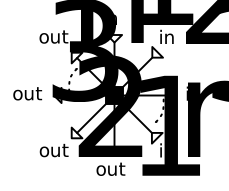
Power inlets: power_in1, power_in2, … (variable, count set by
num_in)Power outlets: power_out1, power_out2, … (variable, count set by
num_out)
Mandatory Equations
energy balance over all inflows and outflows:
energy_balance_func
- Parameters:
char_warnings (bool) – Ignore warnings on default characteristics usage for this component.
design (list) – List containing design parameters (stated as String).
design_path (str) – Path to the components design case.
label (str) – The label of the component.
local_design (bool) – Treat this component in design mode in an offdesign calculation.
local_offdesign (bool) – Treat this component in offdesign mode in a design calculation.
num_in (int) – Number of inlets.
num_out (int) – Number of outlets.
offdesign (list) – List containing offdesign parameters (stated as String).
printout (bool) – Include this component in the network’s results printout.
Example
In a very simple example, a PowerBus is utilized to distribute power from the grid to 3 different consumers.
>>> from tespy.components import PowerSource, PowerSink, PowerBus
>>> from tespy.connections import PowerConnection
>>> from tespy.networks import Network
>>> nw = Network(iterinfo=False)
>>> nw.units.set_defaults(**{
...     "pressure": "bar", "pressure_difference": "bar",
...     "temperature": "degC"
... })
We can add a PowerSource representing the grid and three PowerSink components representing different power demands.
>>> grid = PowerSource('grid')
>>> bus = PowerBus('power bus', num_in=1, num_out=3)
>>> demand1 = PowerSink('power demand 1')
>>> demand2 = PowerSink('power demand 2')
>>> demand3 = PowerSink('power demand 3')
>>> e1 = PowerConnection(grid, 'power', bus, 'power_in1')
>>> e2 = PowerConnection(bus, 'power_out1', demand1, 'power')
>>> e3 = PowerConnection(bus, 'power_out2', demand2, 'power')
>>> e4 = PowerConnection(bus, 'power_out3', demand3, 'power')
>>> nw.add_conns(e1, e2, e3, e4)
We have 4 variables (4 energy flows) and one equation (bus energy balance) in our system. That means, we have to fix three values of the variables, e.g. we can fix the three demand values:
>>> e2.set_attr(E=10e3)
>>> e3.set_attr(E=20e3)
>>> e4.set_attr(E=30e3)
>>> nw.solve('design')
>>> nw.assert_convergence()
>>> round(e1.E.val_SI) == 60000
True
- classmethod port_schema()[source]
Return a description of the component’s port topology for UI tooling.
The default implementation derives fixed-port descriptions from the
@staticmethodinlets/outlets/powerinlets/poweroutletsmethods. Subclasses with variable or conditional port counts must override this method.- Returns:
dict – Keys are
"inlets","outlets","powerinlets","poweroutlets","heatinlets","heatoutlets". Each value is a dict with at least a"type"key:{"type": "fixed", "ports": [...]}The port list is static.
{"type": "variable", "parameter": str, "pattern": str, "min": int}Port count is controlled by parameter. pattern is a Python format string where
{n}is replaced by the 1-based port index (e.g."in{n}").
tespy.components.power.generator module
Module of class Generator.
This file is part of project TESPy (github.com/oemof/tespy). It’s copyrighted by the contributors recorded in the version control history of the file, available from its original location tespy/components/power/generator.py
SPDX-License-Identifier: MIT
- class tespy.components.power.generator.Generator(label, **kwargs)[source]
Bases:
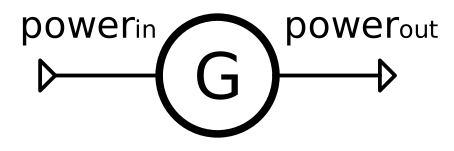
_EnergyConverterA generator converts mechanical energy into electrical energy.

Ports
Power inlets: power_in
Power outlets: power_out
Mandatory Equations
None
- Parameters:
char_warnings (bool) – Ignore warnings on default characteristics usage for this component.
delta_power (float, dict) – Inlet to outlet power difference. Quantity:
power. Equation:delta_power_func.design (list) – List containing design parameters (stated as String).
design_path (str) – Path to the components design case.
eta (float, dict) – Efficiency. Quantity:
efficiency. Equation:eta_func.eta_char (tespy.tools.characteristics.CharLine, dict) – Efficiency lookup table for offdesign. Equation:
eta_char_func.label (str) – The label of the component.
local_design (bool) – Treat this component in design mode in an offdesign calculation.
local_offdesign (bool) – Treat this component in offdesign mode in a design calculation.
offdesign (list) – List containing offdesign parameters (stated as String).
printout (bool) – Include this component in the network’s results printout.
Example
A turbine generates mechanical power which is used to generate electrical power by the generator.
>>> from tespy.components import Sink, Source, Turbine, Generator, PowerSink
>>> from tespy.connections import Connection, PowerConnection
>>> from tespy.networks import Network
>>> nw = Network(iterinfo=False)
>>> nw.units.set_defaults(**{
...     "pressure": "bar", "pressure_difference": "bar",
...     "temperature": "degC"
... })
>>> so = Source('source')
>>> si = Sink('sink')
>>> turbine = Turbine('turbine')
Steam flows through the turbine and we can set it up as we are used to for systems without power components.
>>> c1 = Connection(so, 'out1', turbine, 'in1')
>>> c2 = Connection(turbine, 'out1', si, 'in1')
>>> nw.add_conns(c1, c2)
>>> c1.set_attr(fluid={'water': 1}, T=500, p=50, m=1)
>>> c2.set_attr(p=5)
>>> turbine.set_attr(eta_s=0.9)
>>> nw.solve('design')
We can add the Generator and a PowerSink and then connect these parts to the turbine.
>>> generator = Generator('generator')
>>> power_sink = PowerSink('power sink')
>>> e1 = PowerConnection(turbine, 'power', generator, 'power_in')
>>> e2 = PowerConnection(generator, 'power_out', power_sink, 'power')
>>> nw.add_conns(e1, e2)
Now we have added two variables to our problem (the power flows of e1 and e2), but only one equation (the power balance for the turbine). The connection between the two power flows can be made through specifying the efficiency of the generator:
>>> generator.set_attr(eta=.98)
>>> nw.solve('design')
>>> nw.assert_convergence()
>>> round(e1.E.val_SI) == -round(turbine.P.val)
True
>>> round(e2.E.val_SI) == -round(turbine.P.val * 0.98)
True
We could also specify the electrical energy instead of fixing the steam mass flow to calculate the resulting steam mass flow:
>>> e2.set_attr(E=1e6)
>>> c1.set_attr(m=None)
>>> nw.solve('design')
>>> round(c1.m.val, 3)
1.837
Or, fix both (electrical and mechanical power flows) and leave open the generator efficiency:
>>> e1.set_attr(E=1.1e6)
>>> generator.set_attr(eta=None)
>>> nw.solve('design')
>>> round(generator.eta.val, 2)
0.91
>>> e1.set_attr(E=None)
>>> generator.set_attr(delta_power=50e3)
>>> nw.solve('design')
>>> round(generator.eta.val, 3)
0.952
- classmethod port_schema()[source]
Return a description of the component’s port topology for UI tooling.
The default implementation derives fixed-port descriptions from the
@staticmethodinlets/outlets/powerinlets/poweroutletsmethods. Subclasses with variable or conditional port counts must override this method.- Returns:
dict – Keys are
"inlets","outlets","powerinlets","poweroutlets","heatinlets","heatoutlets". Each value is a dict with at least a"type"key:{"type": "fixed", "ports": [...]}The port list is static.
{"type": "variable", "parameter": str, "pattern": str, "min": int}Port count is controlled by parameter. pattern is a Python format string where
{n}is replaced by the 1-based port index (e.g."in{n}").
tespy.components.power.motor module
Module of class Motor.
This file is part of project TESPy (github.com/oemof/tespy). It’s copyrighted by the contributors recorded in the version control history of the file, available from its original location tespy/components/power/motor.py
SPDX-License-Identifier: MIT
- class tespy.components.power.motor.Motor(label, **kwargs)[source]
Bases:
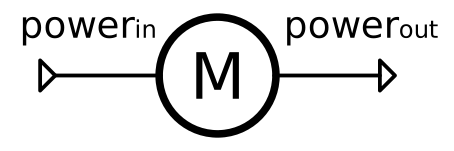
_EnergyConverterA motor converts electrical energy into mechanical energy.

Ports
Power inlets: power_in
Power outlets: power_out
Mandatory Equations
None
- Parameters:
char_warnings (bool) – Ignore warnings on default characteristics usage for this component.
delta_power (float, dict) – Inlet to outlet power difference. Quantity:
power. Equation:delta_power_func.design (list) – List containing design parameters (stated as String).
design_path (str) – Path to the components design case.
eta (float, dict) – Efficiency. Quantity:
efficiency. Equation:eta_func.eta_char (tespy.tools.characteristics.CharLine, dict) – Efficiency lookup table for offdesign. Equation:
eta_char_func.label (str) – The label of the component.
local_design (bool) – Treat this component in design mode in an offdesign calculation.
local_offdesign (bool) – Treat this component in offdesign mode in a design calculation.
offdesign (list) – List containing offdesign parameters (stated as String).
printout (bool) – Include this component in the network’s results printout.
Example
A compressor provides compressed air which is used in a compressed air distribution system. The energy is provided by an electrical motor.
>>> from tespy.components import Sink, Source, Compressor, Motor, PowerSource
>>> from tespy.connections import Connection, PowerConnection
>>> from tespy.networks import Network
>>> nw = Network(iterinfo=False)
>>> nw.units.set_defaults(**{
...     "pressure": "bar", "pressure_difference": "bar",
...     "temperature": "degC"
... })
>>> so = Source('source')
>>> si = Sink('sink')
>>> compressor = Compressor('compressor')
Ambient air flows into the compressor and is ejected at 4 bar. We can set the system up without the use of any of the power components.
>>> c1 = Connection(so, 'out1', compressor, 'in1')
>>> c2 = Connection(compressor, 'out1', si, 'in1')
>>> nw.add_conns(c1, c2)
>>> c1.set_attr(fluid={'air': 1}, T=25, p=1, m=1)
>>> c2.set_attr(p=4)
>>> compressor.set_attr(eta_s=0.8)
>>> nw.solve('design')
We can add the Motor and a PowerSource and then connect these parts to the compressor.
>>> motor = Motor('motor')
>>> power_source = PowerSource('power source')
>>> e1 = PowerConnection(power_source, 'power', motor, 'power_in')
>>> e2 = PowerConnection(motor, 'power_out', compressor, 'power')
>>> nw.add_conns(e1, e2)
Now we have added two variables to our problem (the power flows of e1 and e2), but only one equation (the power balance for the compressor). The connection between the two power flows can be made through specifying the efficiency of the motor:
>>> motor.set_attr(eta=.98)
>>> nw.solve('design')
>>> nw.assert_convergence()
>>> round(e2.E.val_SI) == round(compressor.P.val)
True
>>> round(e1.E.val_SI) == round(compressor.P.val / 0.98)
True
We could also specify the electrical energy instead of fixing the air mass flow to calculate the resulting air mass flow:
>>> e1.set_attr(E=1e5)
>>> c1.set_attr(m=None)
>>> nw.solve('design')
>>> round(c1.m.val, 3)
0.539
Or, fix both (electrical and mechanical power flows) and leave open the motor efficiency:
>>> e2.set_attr(E=0.9e5)
>>> motor.set_attr(eta=None)
>>> nw.solve('design')
>>> round(motor.eta.val, 2)
0.9
>>> e2.set_attr(E=None)
>>> motor.set_attr(delta_power=5e3)
>>> nw.solve('design')
>>> round(motor.eta.val, 3)
0.95
- classmethod port_schema()[source]
Return a description of the component’s port topology for UI tooling.
The default implementation derives fixed-port descriptions from the
@staticmethodinlets/outlets/powerinlets/poweroutletsmethods. Subclasses with variable or conditional port counts must override this method.- Returns:
dict – Keys are
"inlets","outlets","powerinlets","poweroutlets","heatinlets","heatoutlets". Each value is a dict with at least a"type"key:{"type": "fixed", "ports": [...]}The port list is static.
{"type": "variable", "parameter": str, "pattern": str, "min": int}Port count is controlled by parameter. pattern is a Python format string where
{n}is replaced by the 1-based port index (e.g."in{n}").
tespy.components.power.sink module
Module of class PowerSink.
This file is part of project TESPy (github.com/oemof/tespy). It’s copyrighted by the contributors recorded in the version control history of the file, available from its original location tespy/components/power/sink.py
SPDX-License-Identifier: MIT
- class tespy.components.power.sink.PowerSink(label, **kwargs)[source]
Bases:
_EnergySinkA power flow drains in a PowerSink.
Ports
Power inlets: power
Mandatory Equations
None
- Parameters:
char_warnings (bool) – Ignore warnings on default characteristics usage for this component.
design (list) – List containing design parameters (stated as String).
design_path (str) – Path to the components design case.
label (str) – The label of the component.
local_design (bool) – Treat this component in design mode in an offdesign calculation.
local_offdesign (bool) – Treat this component in offdesign mode in a design calculation.
offdesign (list) – List containing offdesign parameters (stated as String).
printout (bool) – Include this component in the network’s results printout.
Example
Create a PowerSink and specify a label.
>>> from tespy.components import PowerSink
>>> si = PowerSink('a labeled sink')
>>> si.label
'a labeled sink'
tespy.components.power.source module
Module of class PowerSource.
This file is part of project TESPy (github.com/oemof/tespy). It’s copyrighted by the contributors recorded in the version control history of the file, available from its original location tespy/components/power/source.py
SPDX-License-Identifier: MIT
- class tespy.components.power.source.PowerSource(label, **kwargs)[source]
Bases:
_EnergySourceA power flow emerges from a PowerSource.
Ports
Power outlets: power
Mandatory Equations
None
- Parameters:
char_warnings (bool) – Ignore warnings on default characteristics usage for this component.
design (list) – List containing design parameters (stated as String).
design_path (str) – Path to the components design case.
label (str) – The label of the component.
local_design (bool) – Treat this component in design mode in an offdesign calculation.
local_offdesign (bool) – Treat this component in offdesign mode in a design calculation.
offdesign (list) – List containing offdesign parameters (stated as String).
printout (bool) – Include this component in the network’s results printout.
Example
Create a PowerSource and specify a label.
>>> from tespy.components import PowerSource
>>> so = PowerSource('a labeled source')
>>> so.label
'a labeled source'