Subsystems: Reusable Component Groups
Subsystems are an easy way to add frequently used component groups such as a drum with evaporator or a preheater with desuperheater to your system. In this section you will learn how to create a subsystem and implement it in your work. The subsystems are highly customizable and thus a very powerful tool, if you require using specific component groups frequently. We provide an example, of how to create a simple subsystem and use it in a simulation.
Custom subsystems
Create a .py file in your working-directory. This file contains the
class definition of your subsystem and at minimum one method:
create_network: Method to create the network of your subsystem.
On top of that you need to add attributes to define the available interfaces of
your subsystem to the remaining network. Set the following attributes before
calling super().__init__() in your __init__ method:
num_in/num_out- number of fluid inlet and outlet portsnum_power_in/num_power_out- number ofPowerConnectioninlet and outlet ports (default: 0)num_heat_in/num_heat_out- number ofHeatConnectioninlet and outlet ports (default: 0)
Fluid ports follow the pattern in{n}/out{n}. Power ports use
power_in{n}/power_out{n} and heat ports use
heat_in{n}/heat_out{n}. All of these are accessible on
self.inlet and self.outlet respectively inside
create_network, and on the subsystem instance when connecting to the
external network. For every power or heat port pair the
SubsystemInterface
enforces \(\dot E_\text{in} = \dot E_\text{out}\), so energy passes
through unchanged - exactly as fluid properties do on the fluid ports.
All other functionalities are inherited by the parent class of the
subsystem object.
Example
Create the subsystem
We create a subsystem for the usage of a waste heat steam generator. The subsystem is built up of a superheater, an evaporator, a drum and an economizer as seen in the figure below.
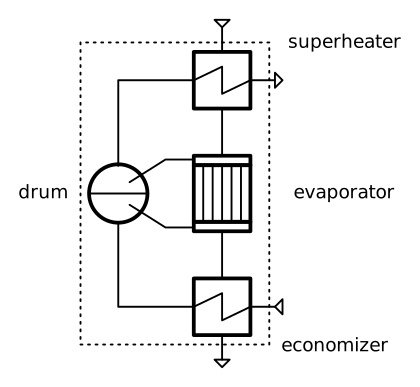
Figure: Topology of the waste heat steam generator

Figure: Topology of the waste heat steam generator
Create a file, e.g. mysubsystems.py and add the following lines:
Imports of the necessary classes from tespy.
Class definition of the subsystem (inheriting from subsystem class).
Methods for component and connection creation. Both, components and connections, are stored in a dictionary for easy access by their respective label.
>>> from tespy.components import Subsystem, HeatExchanger, Drum
>>> from tespy.connections import Connection

>>> class WasteHeatSteamGenerator(Subsystem):
...     """Class documentation"""
...     def __init__(self, label):
...         self.num_in = 2
...         self.num_out = 2
...         super().__init__(label)
...
...     def create_network(self):
...         """Define the subsystem's connections."""
...         eco = HeatExchanger('economizer')
...         eva = HeatExchanger('evaporator')
...         sup = HeatExchanger('superheater')
...         drum = Drum('drum')
...
...         inlet_eco = Connection(self.inlet, 'out2', eco, 'in2', label='1')
...         eco_dr = Connection(eco, 'out2', drum, 'in1', label='2')
...         dr_eva = Connection(drum, 'out1', eva, 'in2', label='3')
...         eva_dr = Connection(eva, 'out2', drum, 'in2', label='4')
...         dr_sup = Connection(drum, 'out2', sup, 'in2', label='5')
...         sup_outlet = Connection(sup, 'out2', self.outlet, 'in2', label='6')
...
...         self.add_conns(inlet_eco, eco_dr, dr_eva, eva_dr, dr_sup, sup_outlet)
...
...         inlet_sup = Connection(self.inlet, 'out1', sup, 'in1', label='11')
...         sup_eva = Connection(sup, 'out1', eva, 'in1', label='12')
...         eva_eco = Connection(eva, 'out1', eco, 'in1', label='13')
...         eco_outlet = Connection(eco, 'out1', self.outlet, 'in1', label='14')
...
...         self.add_conns(inlet_sup, sup_eva, eva_eco, eco_outlet)
Make use of your subsystem
We create a network and use the subsystem we just created along with the different tespy classes required.
>>> from tespy.networks import Network
>>> from tespy.components import Source, Sink
>>> from tespy.connections import Connection
>>> import numpy as np

>>> # %% network definition
>>> nw = Network(iterinfo=False)
>>> nw.units.set_defaults(
...     temperature="degC", pressure="bar", pressure_difference="bar"
... )

>>> # %% component definition
>>> feed_water = Source('feed water inlet')
>>> steam = Sink('live steam outlet')
>>> waste_heat = Source('waste heat inlet')
>>> chimney = Sink('waste heat chimney')

>>> sg = WasteHeatSteamGenerator('waste heat steam generator')

>>> # %% connection definition
>>> fw_sg = Connection(feed_water, 'out1', sg, 'in2')
>>> sg_ls = Connection(sg, 'out2', steam, 'in1')
>>> fg_sg = Connection(waste_heat, 'out1', sg, 'in1')
>>> sg_ch = Connection(sg, 'out1', chimney, 'in1')

>>> nw.add_conns(fw_sg, sg_ls, fg_sg, sg_ch)
>>> nw.add_subsystems(sg)

>>> # %% connection parameters
>>> fw_sg.set_attr(fluid={'water': 1}, T=25, m0=15)
>>> fg_sg.set_attr(fluid={'air': 1}, T=650, m=100)
>>> sg_ls.set_attr(p=130, T=600, design=['T'])
>>> sg_ch.set_attr(p=1)

>>> sg.get_conn('4').set_attr(x=0.6)

>>> # %% component parameters
>>> sg.get_comp('economizer').set_attr(
...     pr1=0.999,  pr2=0.97, design=['pr1', 'pr2'],
...     offdesign=['zeta1_d4', 'zeta2_d4', 'UA_char']
... )

>>> sg.get_comp('evaporator').set_attr(
...     pr1=0.999, ttd_l=20, design=['pr1', 'ttd_l'],
...     offdesign=['zeta1_d4', 'UA_char']
... )

>>> sg.get_comp('superheater').set_attr(
...     pr1=0.999,  pr2=0.99, design=['pr1', 'pr2'],
...     offdesign=['zeta1_d4', 'zeta2_d4', 'UA_char']
... )

>>> sg.get_conn('2').set_attr(td_bubble=5, design=['td_bubble'])

>>> # %% solve
>>> # solve design case
>>> nw.solve('design')
>>> nw.assert_convergence()
>>> nw.save('tmp.json')

>>> # offdesign test
>>> nw.solve('offdesign', design_path='tmp.json')
>>> nw.assert_convergence()
Example: compressor subsystem with a power inlet
This example shows how to expose a
PowerConnection port on a
subsystem. The subsystem wraps a
Compressor. Component
parameters that vary between use cases are left unset inside
create_network and configured from the outside via
get_comp().
>>> from tespy.components import Compressor, PowerSource, Sink, Source, Subsystem
>>> from tespy.connections import Connection, PowerConnection
>>> from tespy.networks import Network

>>> class CompressorSubsystem(Subsystem):
...     def __init__(self, label):
...         self.num_in = 1
...         self.num_out = 1
...         self.num_power_in = 1
...         super().__init__(label)
...
...     def create_network(self):
...         comp = Compressor("compressor")
...         c1 = Connection(self.inlet, "out1", comp, "in1", label="c1")
...         c2 = Connection(comp, "out1", self.outlet, "in1", label="c2")
...         p1 = PowerConnection(
...             self.inlet, "power_out1", comp, "power", label="p1"
...         )
...         self.add_conns(c1, c2, p1)

>>> nw = Network(iterinfo=False)
>>> nw.units.set_defaults(temperature="degC", pressure="bar", power="kW")

>>> source = Source("source")
>>> sink = Sink("sink")
>>> ps = PowerSource("grid")
>>> sub = CompressorSubsystem("sub")

>>> c_in = Connection(source, "out1", sub.inlet, "in1", label="c_in")
>>> c_out = Connection(sub.outlet, "out1", sink, "in1", label="c_out")
>>> p_in = PowerConnection(ps, "power", sub.inlet, "power_in1", label="p_in")

>>> nw.add_conns(c_in, c_out, p_in)
>>> nw.add_subsystems(sub)

>>> c_in.set_attr(fluid={"air": 1}, T=20, p=1, m=1)
>>> c_out.set_attr(p=5)
>>> sub.get_comp("compressor").set_attr(eta_s=0.8)

>>> nw.solve("design")
>>> nw.assert_convergence()

>>> # E is identical on both sides of the power interface
>>> sub.inlet.power_inl[0].E.val_SI == sub.inlet.power_outl[0].E.val_SI
True
The same pattern applies for heat ports: set num_heat_in or
num_heat_out and use a
HeatConnection with port names
heat_in{n} and heat_out{n}.