Components
In this section we will introduce you to the details of component parametrisation and component characteristics. At the end of the section we show you how to create custom components.
List of components
More information on the components can be gathered from the code documentation. We have linked the base class containing a figure and basic information as well as the equations.
Basics
Combustion
Diabatic combustion chamber(Advanced version of combustion chamber, featuring heat losses and pressure drop)
Heat exchangers
Nodes
Piping
Reactors
Turbomachinery
Power components
Component parametrisation
All parameters of components are objects of a DataContainer class. The
data container for component parameters is called
ComponentProperties, ComponentCharacteristics for component
characteristics, and ComponentCharacteristicMaps for characteristic
maps. The main purpose of having a data container for the parameters (instead
of pure numbers), is added flexibility for the user. There are different ways
for you to specify and access component parameters.
Component parameters
The example shows different ways to specify the heat transfer coefficient of an evaporator and how to unset the parameter again.
>>> from tespy.components import HeatExchanger
>>> from tespy.tools import ComponentProperties as dc_cp
>>> import numpy as np

>>> he = HeatExchanger('evaporator')

>>> # specify the value
>>> he.set_attr(kA=1e5)
>>> # specify via dictionary
>>> he.set_attr(kA={'_val': 1e5, 'is_set': True})
>>> # set data container parameters
>>> he.kA.set_attr(_val=1e5, is_set=True)
>>> he.kA.is_set
True

>>> # possibilities to unset a value
>>> he.set_attr(kA=np.nan)
>>> he.set_attr(kA=None)
>>> he.kA.set_attr(is_set=False)
>>> he.kA.is_set
False
Grouped parameters
Grouped parameters are used whenever a component property depends on multiple parameters. For instance, the pressure loss calculation via Darcy-Weissbach requires information about the length, diameter and roughness of the pipe. The solver will prompt a warning, if you do not specify all parameters required by a parameter group. If parameters of the group are missing, the equation will not be implemented by the solver.
>>> from tespy.components import Pipe, Source, Sink
>>> from tespy.networks import Network
>>> from tespy.connections import Connection

>>> nw = Network(T_unit='C', p_unit='bar')

>>> so = Source('source')
>>> si = Sink('sink')
>>> my_pipe = Pipe('pipe')

>>> c1 = Connection(so, 'out1', my_pipe, 'in1')
>>> c2 = Connection(my_pipe, 'out1', si, 'in1')
>>> nw.add_conns(c1, c2)
>>> c1.set_attr(fluid={"CH4": 1}, m=1, p=10, T=25)
>>> c2.set_attr(p0=10, T=25)

>>> # specify grouped parameters
>>> my_pipe.set_attr(D=0.1, L=20, ks=0.00005)
>>> nw.solve('design', init_only=True)
>>> my_pipe.darcy_group.is_set
True

>>> # the solver will not apply an equation, since the information of the
>>> # pipe's length is now missing (by removing it as follows).
>>> c2.set_attr(p=10)
>>> my_pipe.set_attr(L=None)
>>> nw.solve('design', init_only=True)
>>> my_pipe.darcy_group.is_set
False
There are several components using parameter groups:
heat_exchanger_simple and pipe
darcy_group(D,L,ks)hw_group(D,L,ks_HW)kA_group(kA,Tamb)kA_char_group(kA_char,Tamb)
solar_collector
darcy_group(D,L,ks)hw_group(D,L,ks_HW)energy_group(E,eta_opt,lkf_lin,lkf_quad,A,Tamb)
parabolic_trough
darcy_group(D,L,ks)hw_group(D,L,ks_HW)energy_group(E,eta_opt,aoi,doc,c_1,c_2,iam_1,iam_2,A,Tamb)
compressor
char_map_eta_s_group(char_map_eta_s,igva)char_map_pr_group(char_map_pr,igva)
Custom variables
It is possible to use component parameters as variables of your system of
equations. In the component parameter list, if a parameter can be a string, it
is possible to specify this parameter as custom variable. For example, given
the pressure ratio pr, length L and roughness ks of a
pipe you may want to calculate the pipe’s diameter D required to
achieve the specified pressure ratio. In this case you need to specify the
diameter the following way.
>>> # make diameter variable of system
>>> my_pipe.set_attr(pr=0.98, L=100, ks=0.00002, D='var')
>>> c2.set_attr(p=None)
>>> nw.solve("design", init_only=True)
>>> my_pipe.darcy_group.is_set
True

>>> # a second way of specifying this is similar to the
>>> # way used in the component parameters section
>>> # val will be used as starting value
>>> my_pipe.darcy_group.is_set = False
>>> my_pipe.set_attr(pr=0.98, L=100, ks=0.00002)
>>> my_pipe.set_attr(D={'_val': 0.2, 'is_set': True, '_is_var': True})
>>> nw.solve("design", init_only=True)
>>> my_pipe.darcy_group.is_set
True
It is also possible to set value boundaries for you custom variable. You can do this, if you expect the result to be within a specific range. But beware: This might result in a non converging simulation, if the actual value is out of your specified range.
>>> # data container specification with identical result,
>>> # benefit: specification of bounds will increase stability
>>> my_pipe.set_attr(D={
...     '_val': 0.2, 'is_set': True, '_is_var': True,
...     'min_val': 0.1, 'max_val': 0.3}
... )
>>> round(my_pipe.D.max_val, 1)
0.3
Component characteristics
Several components integrate parameters using a characteristic function. These parameters come with default characteristics. The default characteristics available can be found in the tespy.data module. Of course, it is possible to specify your own characteristic functions.
Note
There are two different characteristics specifications
The characteristic function can be an auxiliary parameter of a different
component property. This is the case for kA_char1
and kA_char2 of heat exchangers as well as the characteristics of a
combustion engine: tiP_char, Q1_char, Q2_char
and Qloss_char.
For all other components, the characteristic function is an individual parameter of the component.
What does this mean?
For the auxiliary functionality the main parameter, e.g. kA_char
of a heat exchanger must be set .kA_char.is_set=True.
For the other functionality the characteristics parameter must be
set e.g. .eta_s_char.is_set=True.
For example, kA_char specification for heat exchangers:
>>> from tespy.components import HeatExchanger
>>> from tespy.tools.characteristics import load_default_char as ldc
>>> from tespy.tools.characteristics import CharLine

>>> nw = Network(T_unit="C", p_unit="bar", iterinfo=False)

>>> he = HeatExchanger('evaporator')
>>> cond = Source('condensate')
>>> steam = Sink('steam')
>>> gas_hot = Source('air inlet')
>>> gas_cold = Sink('air outlet')

>>> c1 = Connection(cond, "out1", he, "in2")
>>> c2 = Connection(he, "out2", steam, "in1")
>>> c3 = Connection(gas_hot, "out1", he, "in1")
>>> c4 = Connection(he, "out1", gas_cold, "in1")

>>> nw.add_conns(c1, c2, c3, c4)

>>> c1.set_attr(fluid={'water': 1}, m=10, p=10, x=0)
>>> c2.set_attr(p=10, x=1)
>>> c3.set_attr(fluid={'air': 1}, T=250, p=1)
>>> c4.set_attr(T=200, p=1)

>>> nw.solve("design")
>>> nw.save("design_case.json")
>>> round(he.kA.val)
503013

>>> # the characteristic function is made for offdesign calculation.
>>> he.set_attr(kA_char={'is_set': True})
>>> c4.set_attr(T=None)
>>> nw.solve("offdesign", design_path="design_case.json")
>>> # since we did not change any property, the offdesign case yields the
>>> # same value as the design kA value
>>> round(he.kA.val)
503013

>>> c1.set_attr(m=9)
>>> # use a characteristic line from the defaults: specify the component, the
>>> # parameter and the name of the characteristic function. Also, specify,
>>> # what type of characteristic function you want to use.
>>> kA_char1 = ldc('HeatExchanger', 'kA_char1', 'DEFAULT', CharLine)
>>> kA_char2 = ldc('HeatExchanger', 'kA_char2', 'EVAPORATING FLUID', CharLine)
>>> he.set_attr(kA_char2=kA_char2)
>>> nw.solve("offdesign", design_path="design_case.json")
>>> round(he.kA.val)
481745

>>> # specification of a data container yields the same result. It is
>>> # additionally possible to specify the characteristics parameter, e.g.
>>> # mass flow for kA_char1 (identical to default case) and volumetric
>>> # flow for kA_char2
>>> he.set_attr(
...     kA_char1={'char_func': kA_char1, 'param': 'm'},
...     kA_char2={'char_func': kA_char2, 'param': 'v'}
... )
>>> nw.solve("offdesign", design_path="design_case.json")
>>> round(he.kA.val)
481745

>>> # or use custom values for the characteristic line e.g. kA vs volumetric
>>> # flow
>>> x = np.array([0, 0.5, 1, 2])
>>> y = np.array([0, 0.8, 1, 1.2])
>>> kA_char2 = CharLine(x, y)
>>> he.set_attr(kA_char2={'char_func': kA_char2, 'param': 'v'})
>>> nw.solve("offdesign", design_path="design_case.json")
>>> round(he.kA.val)
475107
Full working example for eta_s_char specification of a turbine.
>>> from tespy.components import Sink, Source, Turbine
>>> from tespy.connections import Connection
>>> from tespy.networks import Network
>>> from tespy.tools.characteristics import CharLine
>>> import numpy as np

>>> nw = Network(p_unit='bar', T_unit='C', h_unit='kJ / kg', iterinfo=False)
>>> si = Sink('sink')
>>> so = Source('source')
>>> t = Turbine('turbine')
>>> inc = Connection(so, 'out1', t, 'in1')
>>> outg = Connection(t, 'out1', si, 'in1')
>>> nw.add_conns(inc, outg)

>>> # design value specification, cone law and eta_s characteristic as
>>> # offdesign parameters
>>> eta_s_design = 0.855
>>> t.set_attr(eta_s=eta_s_design, design=['eta_s'], offdesign=['eta_s_char','cone'])

>>> # Characteristics x as m/m_design and y as eta_s(m)/eta_s_design
>>> # make sure to cross the 1/1 point (design point) to yield the same
>>> # output in the design state of the system
>>> line = CharLine(
...     x=[0.1, 0.3, 0.5, 0.7, 0.9, 1, 1.1],
...     y=np.array([0.6, 0.65, 0.75, 0.82, 0.85, 0.855, 0.79]) / eta_s_design
... )

>>> # default parameter for x is m / m_design
>>> t.set_attr(eta_s_char={'char_func': line})
>>> inc.set_attr(fluid={'water': 1}, m=10, T=550, p=110, design=['p'])
>>> outg.set_attr(p=0.5)
>>> nw.solve('design')
>>> nw.save('tmp.json')
>>> # change mass flow value, e.g. 3 kg/s and run offdesign calculation
>>> inc.set_attr(m=3)
>>> nw.solve('offdesign', design_path='tmp.json')
>>> # isentropic efficiency should be at 0.65
>>> round(t.eta_s.val, 2)
0.65

>>> # alternatively, we can specify the volumetric flow v / v_design for
>>> # the x lookup
>>> t.set_attr(eta_s_char={'param': 'v'})
>>> nw.solve('offdesign', design_path='tmp.json')
>>> round(t.eta_s.val, 2)
0.84
Instead of writing your custom characteristic line information directly into
your Python script, TESPy provides a second method of implementation: It is
possible to store your data in the HOME/.tespy/data folder and import
from there. For additional information on formatting and usage, look into
this part.
from tespy.tools.characteristics import load_custom_char as lcc

eta_s_char = dc_cc(func=lcc('my_custom_char', CharLine), is_set=True)
t.set_attr(eta_s_char=eta_s_char)
It is possible to allow value extrapolation at the lower and upper limit of the
value range at the creation of characteristic lines. Set the extrapolation
parameter to True.
# use custom specification parameters
>>> x = np.array([0, 0.5, 1, 2])
>>> y = np.array([0, 0.8, 1, 1.2])
>>> kA_char1 = CharLine(x, y, extrapolate=True)
>>> kA_char1.extrapolate
True

>>> # set extrapolation to True for existing lines, e.g.
>>> he.kA_char1.char_func.extrapolate = True
>>> he.kA_char1.char_func.extrapolate
True
Characteristics are available for the following components and parameters:
combustion engine
tiP_char: thermal input vs. power ratio.Q1_char: heat output 1 vs. power ratio.Q2_char: heat output 2 vs. power ratio.Qloss_char: heat loss vs. power ratio.
compressor
char_map: pressure ratio vs. non-dimensional mass flow.char_map: isentropic efficiency vs. non-dimensional mass flow.eta_s_char: isentropic efficiency.
heat exchangers:
kA1_char, kA2_char: heat transfer coefficient.
pump
eta_s_char: isentropic efficiency.flow_char: absolute pressure change.
simple heat exchangers
kA_char: heat transfer coefficient.
turbine
eta_s_char: isentropic efficiency.
valve
dp_char: absolute pressure change.
water electrolyzer
eta_char: efficiency vs. load ratio.
For more information on how the characteristic functions work click here.
Extend components with new equations
You can easily add custom equations to the existing components. In order to do this, you need to implement four changes to the desired component class:
modify the
get_parameters(self)method.add a method, that returns the result of your equation.
add a method, that returns the variables your equation depends on.
In the get_parameters(self) method, add an entry for your new equation.
If the equation uses a single parameter, use the ComponentProperties
type DataContainer (or the ComponentCharacteristics type in case you
only apply a characteristic curve). If your equations requires multiple
parameters, add these parameters as ComponentProperties or
ComponentCharacteristics respectively and add a
GroupedComponentProperties type DataContainer holding the information,
e.g. like the darcy_group parameter of the
tespy.components.heat_exchangers.simple.SimpleHeatExchanger
class shown below.
# [...]
'D': dc_cp(min_val=1e-2, max_val=2, d=1e-4),
'L': dc_cp(min_val=1e-1, d=1e-3),
'ks': dc_cp(val=1e-4, min_val=1e-7, max_val=1e-3, d=1e-8),
'darcy_group': dc_gcp(
    elements=['L', 'ks', 'D'], num_eq_sets=1,
    func=self.darcy_func,
    dependents=self.darcy_dependents
),
# [...]
func and dependents are pointing to the method that should be
applied for the corresponding purpose. For more information on defining the
equations and dependents you will find the information in the next section on
custom components. When defining the dependents in a standalone way, the
partial derivatives are calculated automatically. If you want to insert the
partial derivatives manually, you can define another function and pass with
the deriv keyword.
Custom components
You can add own components. The class should inherit from the
component class or its
children. In order to do that, you can use the customs module or create a
python file in your working directory and import the base class for your
custom component. Now create a class for your component and at least add the
following methods.
component(self),get_parameters(self),get_mandatory_constraints(self),inlets(self),outlets(self)andcalc_parameters(self).
Optionally, you can add
powerinlets(self)andpoweroutlets(self)
in case your component should have methods to connect the material flows with
non-material flows associated with a PowerConnection.
Note
For more information on the PowerConnection please check the
respective section in the docs.
The starting lines of your file should look like this:
from tespy.components.component import Component
from tespy.tools import ComponentCharacteristics as dc_cc
from tespy.tools import ComponentMandatoryConstraints as dc_cmc
from tespy.tools import ComponentProperties as dc_cp

class MyCustomComponent(Component):
    """
    This is a custom component.

    You can add your documentation here. From this part, it should be clear
    for the user, which parameters are available, which mandatory equations
    are applied and which optional equations can be applied using the
    component parameters.
    """

    def component(self):
        return 'name of your component'
Mandatory Constraints
The get_mandatory_constraints() method must return a dictionary
containing the information for the mandatory constraints of your component.
The corresponding equations are applied independently of the user
specification. Every key of the mandatory constraints represents one set of
equations. It holds another dictionary with information on
the equations,
the number of equations for this constraint and
the variables each equation depends on.
Furthermore more optional specifications can be made
the partial derivatives,
whether the derivatives are constant values or not (
True/False) andthe structure_matrix keyword.
For example, the mandatory equations of the class Valve look are the
following:
The corresponding method looks like this:
    def get_mandatory_constraints(self):
        constraints = super().get_mandatory_constraints()
        constraints.update({
            'enthalpy_constraints': dc_cmc(**{
                'structure_matrix': self.variable_equality_structure_matrix,
                'num_eq_sets': 1,
                'func_params': {'variable': 'h'}
            })
        })
        return constraints
The method inherits from the Component base class and then adds the
enthalpy equality constraint on top of the mass flow equality and fluid
equality constraints.
Note
In this simple case only the structure_matrix has to be provided.
It creates a mapping between linearly dependent pairs of variables and is
utilized to simplify the problem during presolving. It is generally
optional.
For equations, that depend on more than two variables, or that do not have
direct linear relationsships additional parameters have to be supplied, e.g.
see the respective method of the class HeatExchanger.
    def get_mandatory_constraints(self):
        constraints = super().get_mandatory_constraints()
        constraints.update({
            'energy_balance_constraints': dc_cmc(**{
                'func': self.energy_balance_func,
                'dependents': self.energy_balance_dependents,
                'num_eq_sets': 1,
            })
        })
        return constraints
Here we have the following keywords:
func: Method to be applied (returns residual value of equation)dependents: Method to return the variablesfuncdepends onnum_eq_sets: Number of equations
Note
In some cases the number of equations can depend on the length of the fluid
vectors associated with the component. num_eq_sets specifically
points to the number of equation per all fluids in the fluid vector. Since
this number is not necessarily known prior to solving the problem, there is
a possibility to update the number of equations after presolving to
determine the correct number. This update is only relevant for classes like
Merge and CombustionChamber etc.. Feel free to reach out in
the discussion forum, if you have any questions about it.
With the above mentioned specifications, tespy will apply the method to
calculate the residual value of your equation and automatically calculates its
partial derivatives towards all variables specified in the dependents
list.
Finally, sometimes it is reasonable to not let tespy automatically calculate all partial derivatives, because the calculation can be computationally expensive. Instead you can additionally provide the following keyword:
deriv: A method that calculate the partial derivatives.
You will find more information and examples on this in the next sections.
You can also define mandatory constraints that are conditional, e.g. in context
of PowerConnections. For example, the connection between the material
flow variables of the inlet and the outlet of the turbine to the non-material
energy output variable of the turbine should only be made, in case the turbine
is actually connected with a PowerConnection:
    def get_mandatory_constraints(self):
        constraints = super().get_mandatory_constraints()
        if len(self.power_outl) > 0:
            constraints["energy_connector_balance"] = dc_cmc(**{
                "func": self.energy_connector_balance_func,
                "dependents": self.energy_connector_dependents,
                "num_eq_sets": 1
            })

        return constraints
Attributes
This part is very similar to the previous one. The get_parameters()
method must return a dictionary with the attributes you want to use for your
component. The keys represent the attributes and the respective values the type
of data container used for this attribute. By using the data container
attributes, it is possible to add defaults. Defaults for characteristic lines
or characteristic maps are loaded automatically by the component initialisation
method of class
tespy.components.component.Component. For more information on the
default characteristics consider this
chapter.
The structure is very similar to the mandatory constraints, e.g. for the
class Valve:
    def get_parameters(self):
        return {
            'pr': dc_cp(
                min_val=1e-4, max_val=1, num_eq_sets=1,
                structure_matrix=self.pr_structure_matrix,
                func=self.pr_func,
                dependents=self.pr_dependents,
                func_params={'pr': 'pr'},
            ),
            'dp': dc_cp(
                min_val=0,
                num_eq_sets=1,
                structure_matrix=self.dp_structure_matrix,
                func=self.dp_func,
                dependents=self.dp_dependents,
                func_params={"inconn": 0, "outconn": 0, "dp": "dp"}
            ),
            'zeta': dc_cp(
                min_val=0, max_val=1e15, num_eq_sets=1,
                func=self.zeta_func,
                dependents=self.zeta_dependents,
                func_params={'zeta': 'zeta'}
            ),
            'dp_char': dc_cc(
                param='m', num_eq_sets=1,
                dependents=self.dp_char_dependents,
                func=self.dp_char_func,
                char_params={'type': 'abs'}
            )
        }
Inlets and outlets
inlets(self) and outlets(self) respectively must return a list
of strings. The list may look like this (of class HeatExchanger)
    @staticmethod
    def inlets():
        return ['in1', 'in2']
    @staticmethod
    def outlets():
        return ['out1', 'out2']
The number of inlets and outlets might even be variable, e.g. if you have added
an attribute 'num_in' your code could look like this (as in class
Merge):
    def inlets(self):
        if self.num_in.is_set:
            return [f'in{i + 1}' for i in range(self.num_in.val)]
        else:
            self.set_attr(num_in=2)
            return self.inlets()
Inlets and outlets for PowerConnections
If your component should incorporate PowerConnections you can define
connctor ids in a similar way, for example power inlet for compressors or
power outlet for turbines. Here the methods are powerinlets and
poweroutlets.
    @staticmethod
    def powerinlets():
        return ["power"]
    @staticmethod
    def poweroutlets():
        return ["power"]
In a similar way, you can add flexibility with a dynamic number of inlets and outlets:
    def powerinlets(self):
        return [f"power_in{i + 1}" for i in range(self.num_in.val)]
    def poweroutlets(self):
        return [f"power_out{i + 1}" for i in range(self.num_out.val)]
Define the required methods
In the above section the concept of the component mandatory constraints and their attributes was introduced. Now we need to fill the respective parts with some life, i.e. how to define
the
structure_matrix(optional),the
func,the
dependentsandthe
deriv(optional) methods.
Define the structure matrix
As mentioned, with the structure matrix you can make a mapping, in case two
variables are linked to each other with a linear relationship. The presolving
of a model will utilize this information to reduce the number of variables.
For example, for a specified pressure ratio pr of a component, where
the inlet and the outlet pressure are linked through this equation:
We can create a method and reference to it from the component mandatory constraints or attribute dictionaries. In this method you have to
place the partial derivatives towards both variables in the component’s
_structure_matrixattribute.place any offset in the component’s
_rhsattribute.
For the example above, the derivative to the inlet pressure is pr, and
to the outlet pressure -1. The offset/right hand side value of the
equation is 0.
    def pr_structure_matrix(self, k, pr=None, inconn=0, outconn=0):
        pr = self.get_attr(pr)
        i = self.inl[inconn]
        o = self.outl[outconn]

        if not pr.is_var:
            self._structure_matrix[k, i.p.sm_col] = pr.val
            self._structure_matrix[k, o.p.sm_col] = -1
A different equation to simplify with this method could be the delta pressure
dp. In this case, the _rhs is not zero, it is the value of
dp.
    def dp_structure_matrix(self, k, dp=None, inconn=0, outconn=0):
        inlet_conn = self.inl[inconn]
        outlet_conn = self.outl[outconn]
        self._structure_matrix[k, inlet_conn.p.sm_col] = 1
        self._structure_matrix[k, outlet_conn.p.sm_col] = -1
        self._rhs[k] = self.get_attr(dp).val_SI
Define the equations
The definition of an equation is quite straight forward: It must return its
residual value. For example, the equation of the dp_char parameter
associated with the class Valve is the following:
    def dp_char_func(self):
        r"""
        Equation for characteristic line of difference pressure to mass flow.

        Returns
        -------
        residual : ndarray
            Residual value of equation.

            .. math::

                0=p_\mathrm{in}-p_\mathrm{out}-f\left( expr \right)
        """
        p = self.dp_char.param
        expr = self.get_char_expr(p, **self.dp_char.char_params)
        if not expr:
            msg = ('Please choose a valid parameter, you want to link the '
                   'pressure drop to at component ' + self.label + '.')
            logger.error(msg)
            raise ValueError(msg)

        return (
            self.inl[0].p.val_SI - self.outl[0].p.val_SI
            - self.dp_char.char_func.evaluate(expr)
        )
Define the dependents
Next, you have to define the list of variables the equation depends on, i.e. towards which variables the partial derivatives should be calculated. In this example, it is the inlet and the outlet pressure, as well as the mass flow and in case the volumetric flow should be used to assess the characteristic function, the inlet enthalpy.
    def dp_char_dependents(self):
        dependents = [
            self.inl[0].m,
            self.inl[0].p,
            self.outl[0].p,
        ]
        if self.dp_char.param == 'v':
            dependents += [self.inl[0].h]
        return dependents
The solver will automatically determine, which of the variables returned by this method are actual variables (have not been presolved) and the calculate the derivative to the specified equation numerically using a central finite difference. In the case of this method, this will be an extra 6 or 8 function evaluations to determine the partial derivatives, if all of the indicated variables are actually system variables (have not been presolved).
The only thing you have to do is, to make the method return a list of variables the equation depends on.
It can be more complex than that when dealing with equations, which have
partial derivatives towards components of a fluid mixture. For example, the
energy balance of the CommbustionChamber depends on the fuel’s mass
fraction in the fluid mixtures of its inlets. To account for this in the
dependents specification, your method has to return a dictionary instead,
which uses the keys
scalarsfor all “standard” variablesvectorsfor all fluid mixture component variables
In the example below, the variable mixture components of the inlets are the
union of the set of fuels available in the CombustionChamber and the
fluid components that are actually variable in the mixture. For this, a
subdictionary is created, which is a mapping of the fluid mixture container
c.fluid to a set of fluid names
self.fuel_list & c.fluid.is_var.
    def energy_balance_dependents(self):
        inl, outl = self._get_combustion_connections()
        return {
            "scalars": [var for c in inl + outl for var in [c.m, c.h]],
            "vectors": [{
                c.fluid: self.fuel_list & c.fluid.is_var for c in inl + outl
            }]
        }
Define the derivatives
The downside of the simple to use approach of defining the equation together with its dependents is, that it can be computationally expensive to calculate the partial derivatives. In this case, it may be reasonable to implement a method specifically for the calculation of the partial derivatives.
For example, consider the isentropic efficiency equation of a Turbine:
    def eta_s_func(self):
        r"""
        Equation for given isentropic efficiency of a turbine.

        Returns
        -------
        residual : float
            Residual value of equation.

            .. math::

                0 = -\left( h_{out} - h_{in} \right) +
                \left( h_{out,s} - h_{in} \right) \cdot \eta_{s,e}
        """
        inl = self.inl[0]
        outl = self.outl[0]
        return (
            -(outl.h.val_SI - inl.h.val_SI)
            + (
                isentropic(
                    inl.p.val_SI,
                    inl.h.val_SI,
                    outl.p.val_SI,
                    inl.fluid_data,
                    inl.mixing_rule,
                    T0=inl.T.val_SI
                )
                - inl.h.val_SI
            ) * self.eta_s.val
        )
The partial derivatives to the inlet and outlet pressure as well as the inlet
enthalpy can only be determined numerically. However, the partial derivative to
the outlet enthalpy can be obtained analytically, it is 1. To save the
extra evaluation of the equation in case the outlet enthalpy is a variable, we
can define the following method:
    def eta_s_deriv(self, increment_filter, k, dependents=None):
        r"""
        Partial derivatives for isentropic efficiency function.

        Parameters
        ----------
        increment_filter : ndarray
            Matrix for filtering non-changing variables.

        k : int
            Position of derivatives in Jacobian matrix (k-th equation).
        """
        dependents = dependents["scalars"][0]
        f = self.eta_s_func
        i = self.inl[0]
        o = self.outl[0]

        if o.h.is_var and not i.h.is_var:
            self._partial_derivative(o.h, k, -1, increment_filter)
            # remove o.h from the dependents
            dependents = dependents.difference(_get_dependents([o.h])[0])

        for dependent in dependents:
            self._partial_derivative(dependent, k, f, increment_filter)
To place the partial derivative you can use the _partial_derivative
method and pass
the variable
the equation number (passed to your method through the argument k)
the value of the partial derivative (a number or a callable)
in case you pass a number, it will put the value directly into the Jacobian
in case you pass a callable, the derivative will be determined numerically for the specified callable and the result will then be passed to the Jacobian
the
increment_filter, which is a lookup for variables, that do not change anymore from one iteration to the next. In this case, the calculation of the derivative will be skipped.
Attention
We cannot simply put down the derivatives for all variables in the Jacobian because we do not necessarily know (prior to solving) which variables will be mapped to a single variable because they are linearly dependent. Thus, we have to use the set of dependents, that is passed to our derivative method. Otherwise, the calculation of the derivative, e.g. for outlet pressure may override the value for inlet pressure, even though both are pointing to the same variable. In case of numerical derivative calculation this is not an issue except for the extra computational effort. But if you have determined the derivatives analytically, then their value might change if two variables are mapped to a single one.
Need assistance?
You are very welcome to open a discussion or submit an issue on the GitHub repository!
Component Groups: Subsystems
Subsystems are an easy way to add frequently used component groups such as a drum with evaporator or a preheater with desuperheater to your system. In this section you will learn how to create a subsystem and implement it in your work. The subsystems are highly customizable and thus a very powerful tool, if you require using specific component groups frequently. We provide an example, of how to create a simple subsystem and use it in a simulation.
Custom subsystems
Create a .py file in your working-directory. This file contains the
class definition of your subsystem and at minimum one method:
create_network: Method to create the network of your subsystem.
On top of that you need to add methods to define the available interfaces of
your subsystem to the remaining network through specifying the number of inlets
and outlets in the __init__ method of your class as seen in the code
example below.
All other functionalities are inherited by the parent class of the
subsystem object.
Example
Create the subsystem
We create a subsystem for the usage of a waste heat steam generator. The subsystem is built up of a superheater, an evaporator, a drum and an economizer as seen in the figure below.
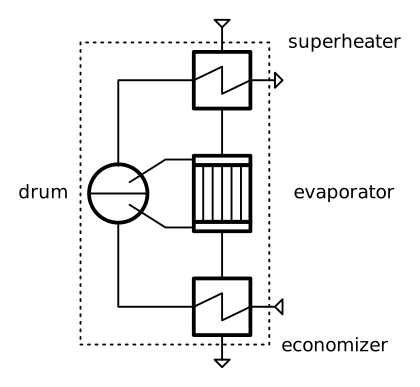
Figure: Topology of the waste heat steam generator

Figure: Topology of the waste heat steam generator
Create a file, e.g. mysubsystems.py and add the following lines:
Imports of the necessary classes from tespy.
Class definition of the subsystem (inheriting from subsystem class).
Methods for component and connection creation. Both, components and connections, are stored in a dictionary for easy access by their respective label.
>>> from tespy.components import Subsystem, HeatExchanger, Drum
>>> from tespy.connections import Connection

>>> class WasteHeatSteamGenerator(Subsystem):
...     """Class documentation"""
...     def __init__(self, label):
...         self.num_in = 2
...         self.num_out = 2
...         super().__init__(label)
...
...     def create_network(self):
...         """Define the subsystem's connections."""
...         eco = HeatExchanger('economizer')
...         eva = HeatExchanger('evaporator')
...         sup = HeatExchanger('superheater')
...         drum = Drum('drum')
...
...         inlet_eco = Connection(self.inlet, 'out2', eco, 'in2', label='1')
...         eco_dr = Connection(eco, 'out2', drum, 'in1', label='2')
...         dr_eva = Connection(drum, 'out1', eva, 'in2', label='3')
...         eva_dr = Connection(eva, 'out2', drum, 'in2', label='4')
...         dr_sup = Connection(drum, 'out2', sup, 'in2', label='5')
...         sup_outlet = Connection(sup, 'out2', self.outlet, 'in2', label='6')
...
...         self.add_conns(inlet_eco, eco_dr, dr_eva, eva_dr, dr_sup, sup_outlet)
...
...         inlet_sup = Connection(self.inlet, 'out1', sup, 'in1', label='11')
...         sup_eva = Connection(sup, 'out1', eva, 'in1', label='12')
...         eva_eco = Connection(eva, 'out1', eco, 'in1', label='13')
...         eco_outlet = Connection(eco, 'out1', self.outlet, 'in1', label='14')
...
...         self.add_conns(inlet_sup, sup_eva, eva_eco, eco_outlet)
Note
Please note, that you should label your components (and connections) with unitque names, otherwise you can only use the subsystem once per model. In this case, it is achieved by adding the subsystem label to all of the component labels.
Make use of your subsystem
We create a network and use the subsystem we just created along with the different tespy classes required.
>>> from tespy.networks import Network
>>> from tespy.components import Source, Sink
>>> from tespy.connections import Connection
>>> import numpy as np

>>> # %% network definition
>>> nw = Network(p_unit='bar', T_unit='C', iterinfo=False)

>>> # %% component definition
>>> feed_water = Source('feed water inlet')
>>> steam = Sink('live steam outlet')
>>> waste_heat = Source('waste heat inlet')
>>> chimney = Sink('waste heat chimney')

>>> sg = WasteHeatSteamGenerator('waste heat steam generator')

>>> # %% connection definition
>>> fw_sg = Connection(feed_water, 'out1', sg, 'in2')
>>> sg_ls = Connection(sg, 'out2', steam, 'in1')
>>> fg_sg = Connection(waste_heat, 'out1', sg, 'in1')
>>> sg_ch = Connection(sg, 'out1', chimney, 'in1')

>>> nw.add_conns(fw_sg, sg_ls, fg_sg, sg_ch)
>>> nw.add_subsystems(sg)

>>> # %% connection parameters
>>> fw_sg.set_attr(fluid={'water': 1}, T=25, m0=15)
>>> fg_sg.set_attr(fluid={'air': 1}, T=650, m=100)
>>> sg_ls.set_attr(p=130, T=600, design=['T'])
>>> sg_ch.set_attr(p=1)

>>> sg.get_conn('4').set_attr(x=0.6)

>>> # %% component parameters
>>> sg.get_comp('economizer').set_attr(
...     pr1=0.999,  pr2=0.97, design=['pr1', 'pr2'],
...     offdesign=['zeta1', 'zeta2', 'kA_char']
... )

>>> sg.get_comp('evaporator').set_attr(
...     pr1=0.999, ttd_l=20, design=['pr1', 'ttd_l'],
...     offdesign=['zeta1', 'kA_char']
... )

>>> sg.get_comp('superheater').set_attr(
...     pr1=0.999,  pr2=0.99, design=['pr1', 'pr2'],
...     offdesign=['zeta1', 'zeta2', 'kA_char']
... )

>>> sg.get_conn('2').set_attr(Td_bp=-5, design=['Td_bp'])

>>> # %% solve
>>> # solve design case
>>> nw.solve('design')
>>> nw.assert_convergence()
>>> nw.save('tmp.json')

>>> # offdesign test
>>> nw.solve('offdesign', design_path='tmp.json')
>>> nw.assert_convergence()
Add more flexibility
If you want to add even more flexibility, you might need to manipulate the
__init__ method of your custom subsystem class. Usually, you do not
need to override this method. However, if you need additional parameters, e.g.
in order to alter the subsystem’s topology or specify additional information,
take a look at the tespy.components.subsystem.Subsystem class and
add your code between the label declaration and the components and connection
creation in the __init__ method.
For example, if you want a variable number of inlets and outlets because you
have a variable number of components groups within your subsystem, you may
introduce an attribute which is set on initialisation and lets you create and
parameterize components and connections generically. This might be very
interesting for district heating systems, turbines with several sections of
equal topology, etc.. For a good start, you can have a look at the
sub_consumer.py of the district heating network in the
oemof_examples
repository.